

SoundGuy is now KABLOOEY!
Sound playback for live shows, improv, sporting events, and more.

$39.99 on the Mac App Store. Free for SoundGuy owners.
Requires macOS 15.6 or later.
Kablooey does not include sound effects. You must provide your own sounds.
What it is
Your sounds. When you want them. In the order you want.
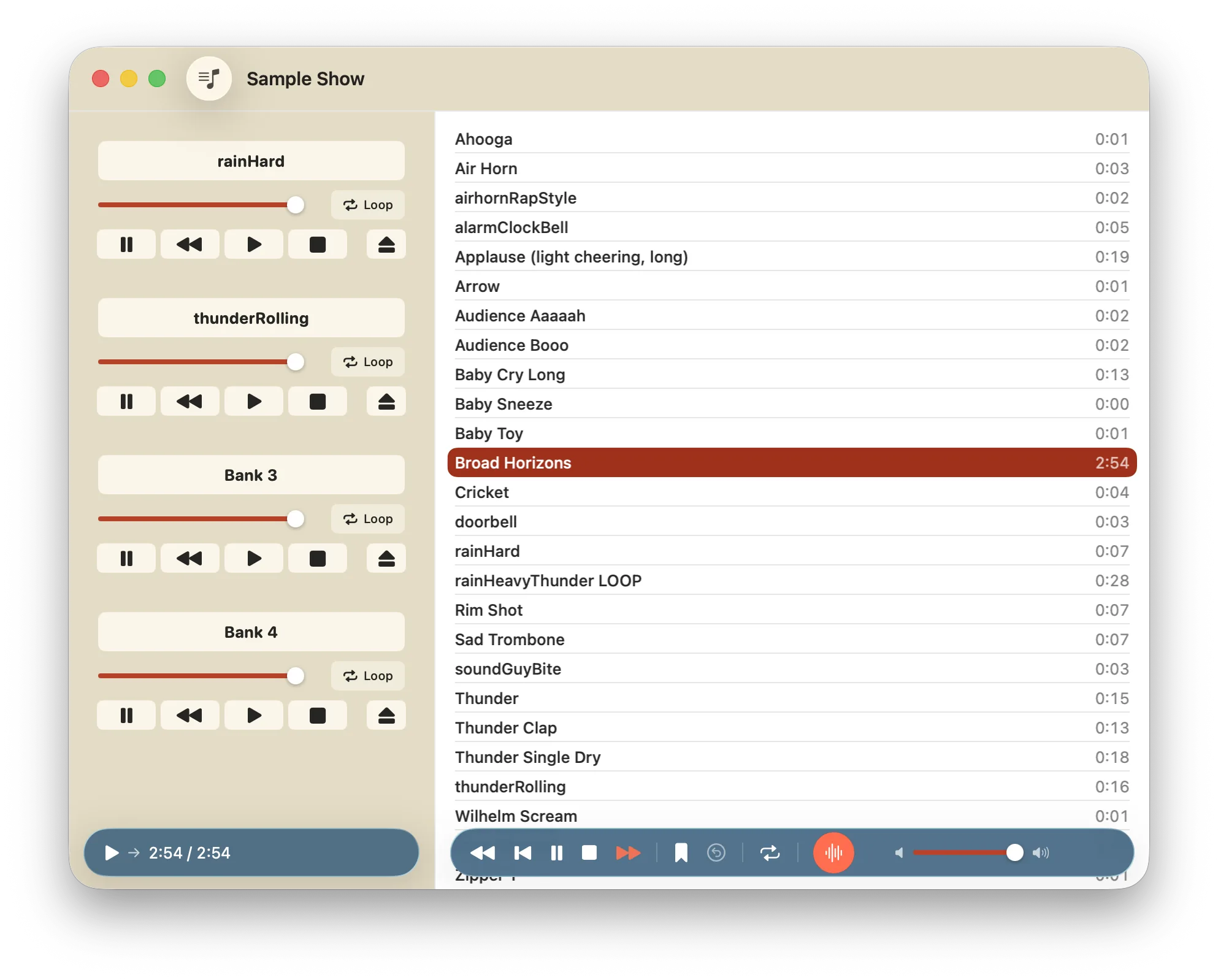
Kablooey is a sound player built for speed. Put your sounds in a show, then fire them whichever way suits the moment.
Play a sound forward or in reverse. Mark a section of music, then repeat it. Load up your banks and you can layer and mix sounds to create environments on the spot. Pressing esc fades everything out and stops.
Made for
- Live theater
- Improv
- Sporting events
- Radio
- Podcasts
- And more
- Shows save themselves.A show is a saved list of sounds for one event.
- One library, many shows.The same sound can appear in as many shows as you like.
- Move between Macs.Export a show with its audio as one file, then import it on another Mac.
Three ways to fire a sound
The list, the Banks, the Playlist.
Use one, or all three at once. They play at the same time.
-
The list
Pick a sound and press Return. Press it again to restart. Search by typing a name, or press /.
Play it backwards with ShiftReturn
-
Four Banks
One-touch triggers on the side of the window. Each has its own volume, loop and direction. Drag a sound onto a Bank to load it.
Play Bank one with Command1
-
The Playlist
Line up a performance and step through it, one cue at a time. Arm a cue, press Return, move to the next. Nothing fires by itself.
Each cue can loop, stop earlier cues, carry its own name and volume. Add text notes between cues.
The Playlist, up close
- Arm a cue, press Return, move on. Nothing fires by itself.
- Shape each cue. Loop it, have it stop the previous cues, rename it, or give it its own volume. Select several cues to set them all at once.
- Rearrange freely. Reorder, copy, cut and paste cues, and add text notes between them.
- Plays alongside everything else. The Playlist runs at the same time as the main list and the Banks.

In the moment
Small controls for the moments that matter.
- Play it backwards. Any sound, from the list or a Bank.
- Loop it. Let a bed run under a scene for as long as it needs.
- Set a mark and jump straight back to it, with a short crossfade, so there is no click.
- Trim and fade. Trim a sound and add a fade in and fade out in the waveform editor, with a preview.
- Stop a Bank with a short fade. CommandShift1 through 4.
- Hit esc and everything fades out. The main player and all four Banks fade over one second. The Playlist has its own Escape.

Your outputs
Send each part of the app where it needs to go.
Send different parts of the app to different outputs: the main player, each Bank, the Playlist, even the previews. Pick the output device and the stereo channel pair for each one.
Check a sound on headphones while the house hears something else.
If an output device is unplugged, its sounds stop and output falls back to the system default. Plug it back in and the routing returns.

Built for the keyboard
Almost everything has a key.
Press ? at any time to see them all in a floating sheet.
Here are a few to start with.
- ?
- Show every keyboard shortcut
- Command?
- Open the Help window
- Return
- Play the selected sound. Again to restart.
- ShiftReturn
- Play it in reverse
- /
- Search the list
- Option1-4
- Load the selected sound into a Bank
- Command1-4
- Play a Bank
- Shift1-4
- Pause a Bank
- CommandShift1-4
- Stop a Bank with a short fade
- esc
- Fade out the main player and all four Banks
Bring your own sounds
Your sounds, your show.
Kablooey does not include sound effects. You must provide your own sounds.
Drag in audio files from Finder. Kablooey copies them into its library, so your originals are never touched.
- WAV
- MP3
- AIFF
- FLAC
- Ogg
- M4A
- CAF
Using a cloud-synced folder? Kablooey downloads missing sounds and tells you when one is not ready yet. For live shows, a library in a normal folder on the Mac is more reliable.
Coming from SoundGuy
Same app, new name.
And a free update for existing owners on the Mac App Store.
Your original files stay exactly where they were.
- On the Welcome screen, click Import SoundGuy Sounds.
- Pick your old SoundGuy sounds folder.
- Kablooey copies every sound into a new show named after the folder. Nothing is changed or moved.
Any time later, File > Import Folder as New Show does the same thing.
Help and videos
Help is one keystroke away.
A built-in guide opens with Command?
Short videos are coming soon.
- Getting startedVideo coming soon
- Banks and the PlaylistVideo coming soon
FAQ
Questions, answered.
Does Kablooey come with sound effects?
No. Kablooey does not include sound effects. You must provide your own sounds.
What do I need to run it?
A Mac running macOS 15.6 or later.
I used SoundGuy. What happens to my sounds?
Nothing is changed. Use Import SoundGuy Sounds on the Welcome screen and Kablooey copies them into a new show. Your original files stay where they are.
How much does it cost?
$39.99 on the Mac App Store. It's a free update if you already own SoundGuy.
Do I have to pay again if I own SoundGuy?
No. Kablooey is a free update for existing SoundGuy owners on the Mac App Store.
Can I use different outputs for different parts of a show?
Yes. Each part of the app can use its own output device and channel pair.
Which file types work?
WAV, MP3, AIFF, FLAC, Ogg, M4A and CAF.
Does it collect any data?
The app collects no data at all. The only thing we ever collect is your email address, and only if you join the mailing list on this website. See the privacy policy.
Can I keep my sounds in iCloud Drive or Dropbox?
You can, but for live shows it is more reliable to keep the library in a normal folder on the Mac, because cloud services can remove local copies to save space.
How do I get help?
Press Command? in the app, or email [email protected].
Mailing list
Hear when there's news.
An occasional email about Kablooey: releases, updates and new videos. Nothing else.

Ready for the next show.
Your sounds, the moment you want them, in any order.
$39.99 on the Mac App Store. Free for SoundGuy owners.
Requires macOS 15.6 or later.